
I’m here to help you find a few new… angles for your job search.
- Know someone “open to work?” Share this with them.
- HR Pros planning layoffs: a no-cost, no-effort addition to any outplacement package.
- College/Grad Administrators: Bishop can help new grads cast a wider net to uncover postings in less obvious job boards across the internet.
Install Claude Code
Install Claude and open the desktop app.
If this is your first time running Claude Code, open “Claude Chat and Cowork” and say “Help me set up Claude Code on my computer.” Follow the instructions.
It may ask you to install a few things like “Git…” That’s normal. If you have questions about what Claude is installing, ask Claude to explain it.
Select “Code” from the menu in the top left corner.
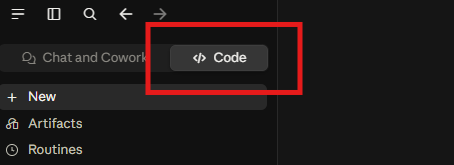
Install via Claude Plugins
On the left sidebar, click Customize.
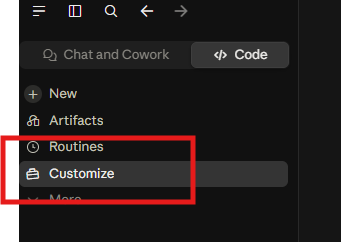
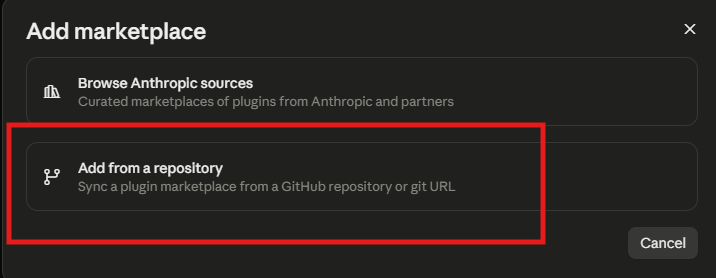
Click the Plugins tab. In the top right, click “Add,” then “Add marketplace.”

“Add from a repository.”
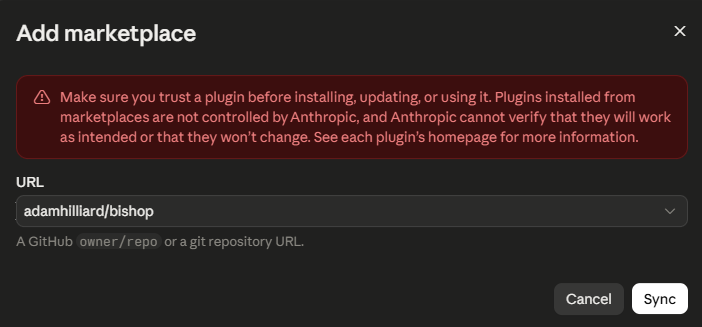
In the box, type “adamhilliard/bishop” and click “Sync.”
“Bishop Job Search” should now appear in the list. Click Install.
Start your job search
All Bishop needs to get started is a resume.
Start a new conversation in Claude Code. It won’t show up in one that was already open.
Say: “Help me set up a job search.” If nothing happens, quit Claude, reopen, and try again.
If “Bishop Job Search” does not appear in the Claude Marketplace
You can still access Bishop on GitHub.
- Download bishop.zip.
- Unzip it, and move the bishop folder into your Claude skills folder. If the folder is not there, create it.
- Windows: %USERPROFILE%\.claude\skills\
- Mac: ~/.claude/skills/
- Quit Claude and reopen it.
- Say: “Help me set up a job search.”